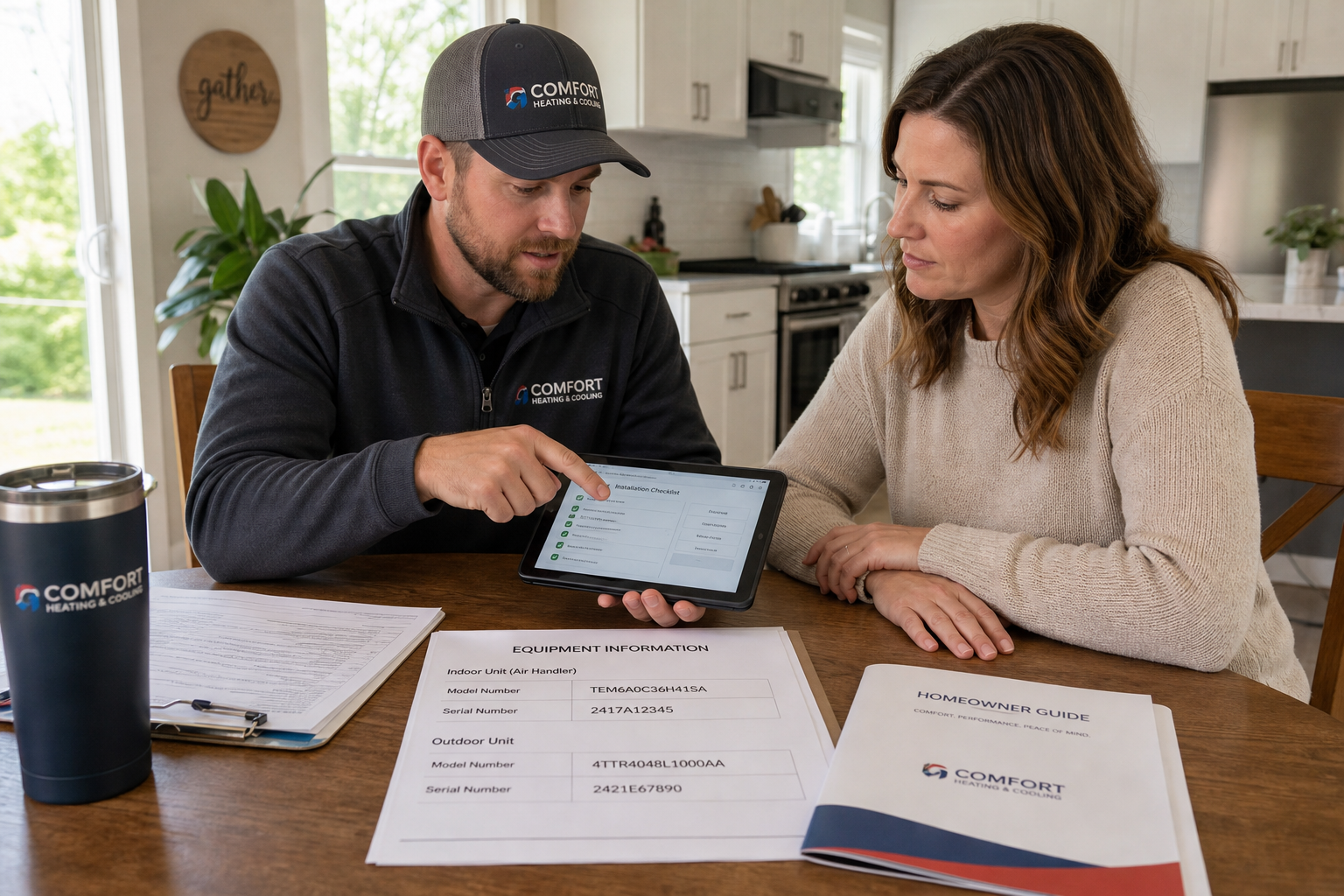
How HVAC Contractors Can Build a Simple System-Registration Process That Protects Manufacturer Warranties and Prevents Post-Install Customer Frustration
A practical workflow for making registration consistent, documented, and easy for both your team and your customers.
For many HVAC contractors, the hard part feels like the sale, the install, and the startup. But some of the most frustrating customer complaints happen after the job is done, when a homeowner assumes the equipment was registered and later learns there is missing paperwork, incomplete documentation, or uncertainty around manufacturer warranty eligibility.
That problem is rarely about bad intent. It is usually the result of an inconsistent handoff. Someone on the team thinks the office handles registration. The office assumes the installer collected the serial numbers. The salesperson believes the homeowner will complete it online. Then months or years later, nobody is fully sure what happened.
A simple HVAC system registration process helps prevent that mess. It creates one clear path from completed installation to documented registration status. It also gives homeowners confidence that you did not disappear after the job. Just as important, it protects your reputation when warranty questions come up.
In this guide, we will walk through how to build a practical registration workflow your team can actually follow. The goal is not to create more paperwork. The goal is to reduce dropped details, support manufacturer warranty requirements where applicable, and prevent avoidable post-install frustration. Because manufacturers, product lines, and local requirements vary, your team should verify registration rules and timing for each brand you install.
A registration process only works when responsibility is obvious. If more than one person might be handling it, chances are no one is truly accountable for it.
Why does a defined system-registration process matter so much?
Registration is one of those back-office tasks that seems small until it becomes very important. Homeowners often do not understand the difference between equipment installation, manufacturer documentation, labor coverage, maintenance expectations, and warranty eligibility. They simply assume that if they hired a professional contractor, everything was handled correctly.
When that assumption is not matched by your internal process, your company becomes the first phone call when confusion surfaces. Even if the warranty outcome is controlled by a manufacturer and not by your company, the customer often blames the installer who sold and installed the job.
A defined HVAC system registration process helps in several ways. First, it creates a standard method for collecting the right data while the equipment information is easy to access. Second, it reduces dependence on memory and verbal handoffs. Third, it gives your office a clear proof trail showing whether registration was completed by your company, by the homeowner, or left pending for a stated reason.
It also improves the customer experience. Homeowners appreciate knowing what was submitted, when it was submitted, and what records they should keep. That level of clarity lowers anxiety and makes your company look organized long after the install crew leaves.
Finally, a repeatable process protects your team internally. It reduces finger-pointing between sales, install, and office staff because the checklist, timing, and ownership are already defined.
Where do HVAC registration processes usually break down?
Most registration failures are not complicated. They happen at predictable points in the job cycle.
One common problem is incomplete equipment information. Installers may photograph the condenser nameplate but miss the indoor unit. They may write down model numbers but transpose serial numbers. On some jobs, accessories, thermostats, or matched-system details are not captured clearly enough for later entry.
Another issue is unclear ownership. If the salesperson promises registration, the installer assumes the office will finish it, and the office waits for paperwork that never arrives, the task stalls. This is especially common in busy seasons when everyone is moving quickly to the next job.
Timing creates problems too. If registration is delayed until days or weeks after installation, the chance of missing documents increases. Crew notes become harder to read, photos are buried in phones, and homeowner contact details may need to be chased down again.
There is also a communication gap with homeowners. Some manufacturers may allow or require different submission paths depending on the brand or product. If the homeowner is expected to participate, but your team does not explain that clearly, the customer may believe registration is complete when it is not.
Finally, many companies fail on documentation. Even when a registration is submitted, there may be no saved confirmation, no screenshot, no PDF, and no note in the customer file. Years later, the company remembers doing it but cannot easily prove it.
What information should your team collect on every install?
Your registration process should begin with standardized field collection. The easiest way to improve accuracy is to make sure every installer gathers the same information in the same format on every replacement or new-system job.
- Homeowner full name as it should appear on registration records.
- Installation address and best contact information.
- Date of installation or date of system startup, based on manufacturer instructions.
- Outdoor unit model and serial number.
- Indoor unit model and serial number.
- Furnace, air handler, coil, or heat pump match information as applicable.
- Accessory model and serial numbers when relevant to the brand or registration path.
- Installing contractor legal business name and contact details used for manufacturer records.
- Clear photos of each equipment data plate.
- Any job notes that explain substitutions, split shipments, backordered components, or phased completion.
Standardization matters more than complexity. A short, mandatory checklist completed the same way every time is better than a long process people skip. Many contractors find that requiring both typed entries and supporting photos catches errors before submission.
If your team installs multiple brands, avoid a one-size-fits-all assumption that every manufacturer wants the same information. Build a core checklist for all jobs, then add brand-specific prompts if needed. Local requirements vary, and manufacturer rules may change, so review your forms periodically.
Who should own the registration step inside your company?
The best answer is usually one primary owner with support from other roles. In many companies, that primary owner is someone in the office or install coordination team, not the salesperson and not the lead installer. The field team should collect the source information, but one person or department should be accountable for making sure the registration task reaches a final documented status.
That final status might be completed by your company, completed by the homeowner with proof received, or pending due to a specific issue that has been assigned for follow-up. What matters is that the task does not live in a gray area.
To make ownership real, define roles clearly.
- The salesperson sets expectations during the sale and avoids vague promises.
- The installer captures all required model, serial, and job-completion details before leaving.
- The office or coordinator submits or manages the registration path based on your company process.
- A manager audits a sample of jobs to verify the process is actually happening.
Do not assume accountability just because a task appears on a job checklist. If registration affects customer trust and future warranty conversations, give it a named owner and a due date.
How can you build a simple repeatable workflow without adding too much admin work?
The most effective workflow is usually the one with the fewest handoffs. Simplicity beats sophistication here.
Start by mapping your current post-install handoff. Identify exactly when the install is considered complete, where model and serial numbers are stored, who reviews the file, and when the customer receives final paperwork. You will usually find at least one avoidable gap.
Then create a basic sequence.
- Installer completes a required closeout checklist before leaving the job.
- Installer uploads nameplate photos and final job details to one central location.
- Office receives an automatic or scheduled alert that the job is ready for registration review.
- Assigned team member verifies equipment details against the sold scope.
- Registration is submitted through the correct manufacturer path when your company is handling it.
- Confirmation is saved to the customer file.
- Homeowner receives a brief email or printed summary explaining the status and what records to keep.
If your software allows task automation, use it. If not, a shared checklist and naming convention can still work well. The process does not need fancy technology to be reliable. It needs consistency.
Set an internal completion window as well. Even if manufacturer timelines vary, your company should aim to handle registration promptly after installation while records are fresh and any missing information can still be corrected easily.
It is also smart to create exception handling rules. For example, what happens if a backordered indoor coil is installed later, a serial plate is unreadable, or a customer changes the billing name after the install? A short written rule for common exceptions prevents delays and confusion.
How should contractors explain registration to homeowners without overpromising?
This part matters because many customer frustrations begin with a misunderstanding, not a technical failure. Your team should explain registration in plain language and avoid presenting it as a magical guarantee.
A good explanation sounds something like this: after installation, we document your equipment information and handle or guide the manufacturer registration step based on the brand and product. Registration requirements and warranty terms vary by manufacturer, so we will let you know what has been submitted and what records you should keep.
That approach does a few important things. It reassures the customer that there is a process. It avoids making blanket promises about coverage terms you do not control. And it gives the homeowner a clear expectation that documentation matters.
Train your sales and install teams to use consistent language. Problems happen when one employee says, everything is fully covered, while another says, you need to go online and do it yourself. The homeowner remembers the easiest version, not the most accurate one.
You should also give customers a short written summary at project closeout. Keep it simple and practical.
- List the installed equipment and key model information.
- State whether your company submitted the registration, assisted with it, or asked the homeowner to complete a step.
- Tell the homeowner where confirmation records are stored or attached.
- Remind them that manufacturer terms, maintenance expectations, and local requirements vary.
- Provide one contact point at your company for paperwork questions.
Clear communication lowers the chance that a homeowner will discover a paperwork issue years later and feel blindsided.
How can you document registration completion so future warranty questions are easier to handle?
Documentation is where many good intentions fall apart. Your team may have completed the registration correctly, but if no proof is stored in an organized way, the benefit is limited.
At minimum, save a confirmation page, email receipt, PDF, screenshot, or internal note showing the date and status of the registration activity. Attach it to the customer record in the same place every time. If your company stores install photos separately from customer documents, make sure both are easy to retrieve.
It also helps to create a standard note format. A consistent internal note might include the registration date, who completed it, what brand portal or method was used, and any exception that still needs follow-up. That level of detail makes later conversations much smoother.
When a customer calls with a warranty concern, your office should be able to answer basic registration-status questions quickly. Even if final warranty decisions depend on the manufacturer, having organized records changes the tone of the conversation. Instead of sounding uncertain, your team can speak with confidence about what was done and when.
For companies trying to reduce callbacks and reputation damage, this is one of the most practical improvements available. Good documentation does not eliminate every dispute, but it prevents a surprising number of avoidable ones.
If a process depends on someone remembering to do one extra thing after a busy install day, it will fail eventually. Build registration into job closeout, not as an optional follow-up.
What should you review with your team to keep the process working over time?
Once the workflow is built, the next challenge is keeping it alive. Registration problems often return when training slips, a new office person joins, or crews get rushed during peak season.
Start by reviewing a small sample of recently completed jobs each month. Check whether equipment photos are clear, customer names match final paperwork, registration confirmations are saved, and homeowners received a closeout summary. You do not need a giant audit. You just need enough visibility to catch drift early.
Look for pattern failures rather than isolated mistakes. If one installer regularly misses indoor serial numbers, fix that coaching issue. If office staff are waiting too long for handoff paperwork, tighten the timing standard. If customers keep asking whether registration was done, improve your closeout communication.
It is also worth maintaining a simple brand reference sheet for your office team. Include the manufacturer name, any common registration path details your staff needs, and where proof should be stored. Since manufacturers update portals and procedures from time to time, assign someone to review and refresh that information periodically.
Most important, remind the team why this matters. Registration is not just admin work. It is part of delivering a complete installation experience. Customers judge professionalism by what happens after the equipment starts up, not only by the quality of the mechanical work.
Frequently asked questions
Should the installer or the office register the equipment?
In most cases, installers should collect accurate field information and the office should own final submission or status tracking. That reduces errors and makes accountability clearer.
What if the homeowner wants to complete registration personally?
That can be workable if the manufacturer allows it, but your company should still document that the homeowner was informed, given the required details, and asked to share confirmation if possible.
Do all manufacturers handle registration the same way?
No. Processes, timing, and warranty-related details vary by manufacturer and product line. Your team should verify current requirements for each brand you install.
What records should be saved in the customer file?
Save model and serial information, equipment photos, the installation date, any submitted confirmation, and a note showing who handled the registration step and when.
How do we avoid overpromising on warranty coverage?
Use consistent language that explains your registration process without guaranteeing terms you do not control. State clearly that manufacturer coverage and local requirements vary.
Final thoughts
A strong HVAC system registration process is not about adding bureaucracy. It is about closing a common gap between installation and long-term customer satisfaction. When your team knows exactly what to collect, who owns the task, how quickly it must be completed, and where proof is stored, you reduce confusion for everyone involved.
The practical payoff is real. Your office handles fewer unpleasant surprise calls. Your installers are less likely to be dragged into paperwork disputes months later. And your customers leave the project feeling that the details were handled professionally from start to finish.
If you want a simple place to start, build one checklist, assign one owner, and create one standard customer closeout message. Those three changes alone can make your registration process far more reliable. From there, refine the system as your team learns where the friction points are.
Just remember that manufacturer procedures and local requirements vary. Review your process regularly, verify current brand-specific rules, and document every completed step. In a business where trust matters, that small discipline can prevent a lot of future frustration.
Join the HVAC Installer Network
Create an installer listing to help homeowners discover your business, learn about your services, view your company information, and connect with you about installation opportunities in your service area.
This article is for general informational purposes only. Manufacturer warranty terms, registration procedures, documentation requirements, and local rules vary by brand, product, and market. Contractors should verify current manufacturer instructions and any applicable local requirements before creating or changing internal registration processes.